|
Recieve free software package from the best catalogues! Get popular software program and scarce applications programs. Recieve software, public domain programs, free tools, and demo software to get in diverse categories. On our directory you may at any time see an innovated computer software, or setup the hottest editions of your favourite PC and mobile programs, services programs, and games. To acquire the right apps to obtain, use handy program sorter or a powerful classifier. The Softempire catalog is always advanced: if there is the newest version of software program you seek, it is most likely to be in the web fullest tools accumulation!
Resources for software development: IDE & Editors, programming, testing, configuration management, databases and components. Huge collection of free components and utilities. Free download of all files.
|
4TOPS Query Tree Editor for MS Access
|
|
Download
|
Buy now!
|
View screenshots
|
Vendor Price: $ 99
License: Shareware
File Size: 0.98 Mb
Version: 3.0
Release Date:
10 May 2006
OS: Win95, Win98, WinME, WinNT 3.x, WinNT 4.x, Windows2000, WinXP
System Requirements:
Office XP
Company: 4TOPS
|
|
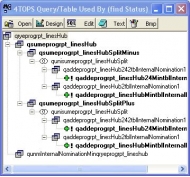
4TOPS Query Tree Editor is an add-in for MS Access for query development. Create queries using templates. Edit and run queries from a tree dialog. The Query Tree dialog displays the dependency tree of the selected query (Uses / Used By). The buttons on the dialogs support a natural way of working with queries, smoothly switching from the tree overview to query editing to saving different versions or running them to evaluate the results. Double-click on a query opens the query datasheet. Press the Edit button to make required changes using the Query Editor. The Print button writes the tree to the Debug Window. Use it to compare query dependency trees or to paste it into your documentation. Double-click on multiple queries to compare results. This will help you diagnose in case queries don't return the results you expected. Supports Access 2000-2007
|
More to download:
Memory Doctor
A cheat and debug tool for Windows 95,98,NT. Allow find, edit and freeze numeric values (life, ammo, money and other in games) in memory of DOS, Windows 3.1 and Windows 95,98,NT programs runned under Windows 95,98,NT. Memory dump. Find strings an...
Software Techniques Parsing Tool (STPT)
Allows a user to extract (parse) numeric data (tables, lists, numbers) and non-numeric data (words, sentences) from any ASCII (text) file easily and efficiently without the need to program complicated and time-consuming file I/O routines.
Power Phone Book for MS Access
Power Phone Book was Microsoft Office Extensions prize-winner.This program combines a simplicity of usage, pleasant interface, power search system, password protection.
Image Albums (For Microsoft Access)
Image Albums is a Microsoft® Access presentation and storage application designed to allow you to organize and share your images in a database.
indexsoft access manager
The powerful web-based manager of .htpasswd, .htgroups and .htaccess files. It gives you easy management and control over all the restricted directories on your web-site, including managing access rights for all users, groups and hosts.
DBX to Entourage Conversion
DBX to Entourage Conversion tool perfectly converts DBX to Entourage with correct email attributes. Software supports simple and easy GUI to help users perform DBX to Entourage conversion effortlessly.
|
|
|
Windows Backup |
Looking for backup software? Try Handy Backup - automatic data backup to DVD, CD, FTP, network, or Online. Client-server enterprise backup software.
|
|
Top Downloads |
Schedule, resume and accelerate downloads by up to 5 times with this accelerator
FrostWire - Download MP3s, Videos & Movies for FREE
Log into web sites with a single click. Fill web form details automatically.
|
|



