|
Obtain utility swiftly and easy. SoftEmpire is cheerful to introduce a big set of the best freeware, utilities, and software applications. On this catalog you may setup trial releases of popular commercial software programs, and setup the most excellent free software for your notebook or digital appliance,gadget. Discover an ultimate set of the best new tools on our library! Download trial editions and obtain new apps on your laptop or cell gadget. Meet the fresh versions and updates of typical app, fresh software solutions, and PC tools! Acquire today!
Computer utility software downloads. The greatest programs for Windows, Linux, and Mac!
System software planned to help analyze, configure, optimise, and maintain the computer.
Disk format utility software for external hard drives, desktops or laptop computings machines.
Windows utility software tool collection to value, organize, and improve the working of the computer.
opened data file backup software for Windows: free downloads.. No user workflow break to back up files and folders. Copying folders to a safe storage is all about the smothness of the auto backing up routine now!
|
Clone
|
|
Download
|
Buy now!
|
View screenshots
|
Vendor Price: $ 30
License: Demo
File Size: 3.76 Mb
Version: 2.1.0
Release Date:
23 Jul 2003
OS: Win95, Win98, WinME, WinNT 3.x, WinNT 4.x, WinXP, Windows2000
System Requirements:
none
Company: Newton Software
|
|
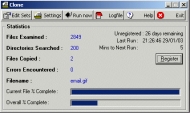
Clone allows you to backup your files. Clone can be run as either a screen saver or as a standard windows utility. Run as a screensave, clone backups up the data that is important to you while you take a break from your computer. This ensures you have a copy of your most important files backed up.
Clone copies files from one location to another. This can be another directory on your hard disk, another hard disk altogether, your CR-RW drive, your floppy disk / zip disk or a network file server. Clone will copy files to any media that can be mapped as a windows directory. As well as making a backup copy you can specify clone keeps old versions of your files, allowing you to go back to a previous version of a file if required. Clone is incredible easy to run and configure.
Clone keeps a track of how many files it has checked and copied so you always know what the program is doing.
Main Features
1) Backup files and directories to a defined location - as many as you like
2) Uses the date and time, file size or the archive attribute to determine if a file should be copied
3) Run as a standard windows utility or as a screen saver
4) If using screen saver mode you can still run your favourite screen saver as well
5) Backup to any media (including CD-RW) that can be mapped to a windows drive or UNC path
6) Schedule backs to occur at set intervals e.g. every 60 minutes
7) Statistics tell you how many files have been analysed / copied
8) Statistics tell you if any errors have occurred
9) A logfile informs you of any problems that have occurred
10) System tray support. Clone is hidden and doesn't clutter your task bar or desktop
11) Can be set to automatically start when windows is started
12) Keep copies of old versions of files which you can go back to later if required
13) Software developers can keep old version of files for backup and configuration management purposes
14) Easy to use interface
15) Help file included
|
More to download:
Clone Hunter
The Clone Hunter solves the problem with tons of identical files wasting your hard drive space. Customizable help criteria and detailed logs will help you to make a choice which files will remain on your hard drive and which files are unnecessary.
When Clones Attack!
A fun (and very silly) freeware shoot'em'up. Defend the galaxy from an ever-increasing army of invading clones.
WebCloner Pro Offline Browser
WebCloner is a site ripper, images and Flash downloader, offline browser, and e-book compiler. You can use it to scan, download, browse and convert to e-books (Self running executables or CHM) entire websites or just parts of them.
iPilot
iPilot is an attractively-looking control center for your CD-ROM and WinAMP. The player is located in the system tray. It contains all functions required to play musical CDs with your CD-ROM. iPilot supports the WinAMP skins...
Taglinator
Taglinator (tm), the easy to use random tagline generator with QuickPad (tm) Mode, GrabPad (tm), command line interface, up to five custom signatures, and over 2,100 taglines. Works with any e-mail or newsreader software. By SRT Enterprises.
AutoDialogs
Using AutoDialogs, you can automatically insert pre-selected folders into your dialog boxes using a system tray menu (requires only 2 clicks) or pre-assigned hot key (one keystroke). No longer need dozens of mouse clicks to navigate to your folders
Frequency Filer
Radio frequency database designed for amateur radio operators or shortwave and scanner enthusiasts. Geographic information can be displayed on a high resolution globe. Incudes data conversion utility...
SynchronEX Backup and FTP
SynchronEX is a versatile tool for synchronization, backup and FTP of files and directories - optimized for one-click automation and supporting shell usage. Possible applications are laptop/server-synchronisation, backup and incremental backup...
iPod Rescue
Frozen iPod data restoration application regain entire your favorite music songs, pictures etc from corrupted or formatted iPod digital player. Software supports all available iPod models like Classic, Shuffle and Mini etc with all storage capacity.
|
|
|
Windows Backup |
Looking for backup software? Try Handy Backup - automatic data backup to DVD, CD, FTP, network, or Online. Client-server enterprise backup software.
|
|
Top Downloads |
Download, save and convert Redtube videos ( redtube.com ) to your PC
PhotoScape is an all-in-one style photo editor with fun and ease of use.
Convert any format video files with fast speed and excellent video quality.
|
|



