|
Excellent software system gettings from the most popular in download webs sites! Browse the popular software system categories, watch the most recent renews of the popular programs solutions, and acquire straight off! Do not miss an option to get the best software solutions: apply SoftEmpire directory to test software package for free of charge. See the accumulation of free utilities and computer software test versions. Choose among OS softwares, download manipulators, playgames, and all other sorts of software for your notebook or digital stuff!
Internet utilities and tools for home and business. Programs for file sharing, download managers and e-mail software. Free download.
|
EmFTP Professional
|
|
Download
|
Buy now!
|
View screenshots
|
Vendor Price: $ 39.99
License: Shareware
File Size: 0.66 Mb
Version: 2.02.2
Release Date:
27 Apr 2007
OS: Windows2000, WinXP, Windows2003, Windows Vista Home Basic, Windows Vista Home Premium, Windows Vista Business, Windows Vista Enterprise, Windows Vista Ultimate
System Requirements:
32 MB RAM, 1 MB free space
Company: Emurasoft, Inc.
|
|
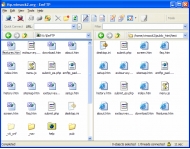
EmFTP Professional is an easy-to-use, high quality FTP/SFTP client. It features SFTP using SSH, Quick Connect Bar, Filter Feature, FTP Fast Transfer using mulitple threads, permission change, and automatic permission settings. It also features Explorer-like look and feel, and robust and responsive operation. EmFTP can work well with EmEditor, the text editor for Windows. If EmEditor is installed, you can edit a server-side file as if it were a local file. You can easily import settings from other FTP client software including FFFTP, Internet Explorer and WS_FTP. The Synchronize Upload feature can copy exactly the same structure of the local folders to the server. The Synchronize Upload feature can copy exactly the same structure of the local folders to the server. Certified for Windows Vista.
You can specify files or folders not to transfer, and files or folders not to delete.
You can create folders, delete files or folders on the server.
You can customize the port number.
You can set passive mode and set "keep alive" with a command like NOOP.
You can specify a time zone for each configuration, and display the date modified at local time.
You can set ASCII mode or binary mode by file types.
You can specify local and server initial folders.
You can set to use last used folders, or EmFTP can move folders synchronously.
Progress dialog box displays each thread status and errors.
You can define external tools and open selected local or server files with a defined external tool.
You can customize an external tool so that if you open a server file with the external tool, EmFTP will download the file to a local temporary directory, and it can automatically upload the modified file when you modify the file.
You can customize toolbars with different buttons, sizes or colors.
The EmFTP user interface is similar to EmEditor. EmFTP has the same look and feel as Windows XP.
|
More to download:
Easy-FTP
With Easy-FTP you can transfer files between your PC and a FTP server. So you can upload files to your homepage or download files from a public FTP server. The program can continue interrupted download. It can delete folders with all subfolders.
FTPCaptain
Make your FTP work effortless. Handy FTP Client with a huge set of
features.
QuickShare File Server
Powerful yet easy to use ftp & http server helps you sharing files. It's supports virtual folders, accounts, resuming and multi-thread transfer, files larger than 4GB, customizeable web template, etc. (Homepage: http://www.quicksharehq.com)
|
|
|
Windows Backup |
Looking for backup software? Try Handy Backup - automatic data backup to DVD, CD, FTP, network, or Online. Client-server enterprise backup software.
|
|
Top Downloads |
Save the earth from invading chickens! Fast-paced action for one or two players.
This chess simulator is strong enough to keep you alert throughout the game.
Etwas zum Lachen: Eine Installations-Anleitung zum Sex, nat?rlich EDV-gest?tzt.
|
|



