|
Excellent app acquisitions from the specialized in download internets sites! Explore the asked-for apps categories, see the latest versions of the notable softwares programs, and download directly! Do not lose chance to try the best programs: apply SoftEmpire website to download software applications for free. Check out the catalogue of freeware and software system trial versions. Select among operating system utilities programs, try planners, antiviruses, and all other sorts of applications for your laptop or mobile stuff!
Internet utilities and tools for home and business. Programs for file sharing, download managers and e-mail software. Free download.
|
FTPGetter
|
|
Downloaden
|
Kaufen
|
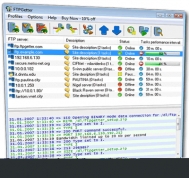
View screenshots
|
Vendor Price: $ 79.85
Softwareart: Shareware
Dateigro?e: 3.69 Mb
Version: 3.00
Erschienen am:
22 Dec 2008
Betriebssystem: Win95, Win98, WinME, WinNT 4.x, WinXP, Windows2000, Windows2003, Windows Vista Starter, Windows Vista Home Basic, Windows Vista Home Premium, Windows Vista Business, Windows Vista Enterprise, Windows Vista Ultimate
Minimale Anforderungen:
A standard Windows PC
Autor: FTPGetter Team
Sprache:


|
|
How many steps do you need to upload your web site updates to the server? Let's count: run an FTP client, connect to the server, select source files and folders on your PC, select a destination folder on an FTP server and press the Upload button. The result is five. Quite a bit? Why not let your computer do all this for you? You need FTPGetter.
FTPGetter is a secure FTP automation scheduler. All you need is to create profiles of the FTP servers with which the program will work. FTPGetter supports FTP and secure FTP over SSL protocols, authorization using PEM/ASN1 or PKCS12 certificates and keys, connection through FTP/SOCKS/HTTP proxy and bandwidth control. For each server profile, automation tasks are created: upload or download, source files and folders, destination folder. Preliminary comparison of source and destination files by modification date/time, MD5 hash or size allows transfers of only new or modified files.
FTPGetter has a unique feature of using wildchars for processing files by mask. For example, if you need to upload only HTML files - you should specify "*.html" as the mask instead of the source file name. FTPGetter will then upload only HTML documents.
Apart from file processing, FTPGetter can process the contents of all subfolders of the source folder that you specify. The program will synchronize the structure of source and destination subfolders. You can be sure that all new subfolders of your site will be automatically uploaded - if the subfolder is lacking on the server it will be automatically created.
Each profile has a built-in scheduler which can help you to set an automation tasks processing schedule.
A built-in FTP Explorer allows you to work with FTP servers just as you do with common FTP client programs. You can browse FTP server folders, create new folders, rename or delete files and folders on the FTP server, manually upload and download files and much more.
|
More to download:
ESFTP
ESftp is a Windows-based file transfer client application that is used to transfer files between your local PC and a remote FTP server. With ESftp, you can connect to any FTP server, browse through directories and files, and resume transfer files.
WebMaster FTP
FTP program designed for webmasters whose sites are on UNIX-like hosts. It has some unique features like automatic setting of the correct file permissions, Explorer-style left folder tree, UNIX special file support and more.
Jildi FTP Client
JilidFTP is a powerful ftp-client program for Windows, it fast and reliable and with lots of useful features.
|
|
|
Windows Backup |
Looking for backup software? Try Handy Backup - automatic data backup to DVD, CD, FTP, network, or Online. Client-server enterprise backup software.
|
|
Top Downloads |
SimplySMS: Send/Read SMS (via serial port) for GSM phones (Siemens,Nokia,others)
Convert 3GP files to MP4 and AVI, video with Free 3GP Video Converter
Simple and flexible Personal Accounting Software
|
|



