|
Surf the most popular software program categories, check the fresh editions of the general applications, and download free! The best downloads for laptop and cell devices. Utilities, free programs, apps, and demo programs, mapped into specific sections are at your service. Software downloads from SoftEmpire catalog bring you good tools and apps for your notebook or mobile devices. All utility programs are free, so you can not only upgrade your notebook with the latest software tools, but also spend sparingly time!
List of utility software downloads for free and discount monetary values!
System software to hike up your computer performance. Make the PC quicker, and the very secure!
Top Disk utility software downloads for Windows 7.
Windows XP utility software free downloads to handle files, registry, rights, and the entire system!
|
Memory Defragmenter
|
|
Download
|
Buy now!
|
View screenshots
|
Vendor Price: $ 15
License: Shareware
File Size: 0.60 Mb
Version: 1.1
Release Date:
29 Jun 2005
OS: Win95, Win98, WinME, WinNT 3.x, WinNT 4.x, Windows2000, WinXP, Windows2003
System Requirements:
None
Company: Abexo
|
|
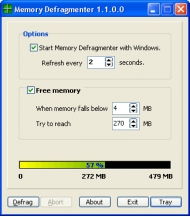
Memory Defragmenter is a software to free up wasted RAM. What is memory (RAM) fragmentation? Windows programs use RAM (Random Access Memory) for their operations, however sometimes they fail to release the RAM after use. This means that parts of your RAM is occupied holding useless data and your computer becomes slow. What is memory (RAM) defrag? The process of freeing the memory (RAM) is called memory (RAM) defrag. Why do I need to defragment my memory (RAM)? You need to defragment your memory (RAM) because fragmentation slows down your computer considerably, since to run your programs smoothly you need as much memory (RAM) as possible. Memory Defragmenter also prevents Windows crashes since Windows crashes mainly occur if there is no free memory (RAM). Which functionalities are included in Memory Defragmenter? When you launch Memory Defragmenter, an icon showing the amount of available memory (RAM) appears in your system tray next to the PC clock. This is useful when you want to know how much memory (RAM) each of your programs use. Anytime there is a problem with one of your programs or Windows generally, check how much memory (RAM) there are available. You can configure Memory Defragmenter to automatically run on Windows startup. You can configure Memory Defragmenter to automatically free memory when the amount of available RAM falls below a certain value. To open the configuration window of Memory Defragmenter right-click its icon in the system tray and select the appropriate option. Alternatively you can just click on Memory Defragmenter icon to maximize it. You can manually free memory (RAM) as desired. To do so you can conveniently just double-click Memory Defragmenter icon in the system tray. What are the minimum requirements to run Memory Defragmenter? Memory Defragmenter runs on all versions of Windows and doesn't have any significant system requirement.
|
More to download:
Amirus Mirror Memory
A Reflective Memory software solution. using standard COTS network components and the processors own internal hardware exception mechanism. The highly-optimized. fault-tolerant design delivers high throughput and millisecond latency on PC systems.
Memory
Test your memory with this excellent shape puzzle game! In this game a number of cards are put on a surface upside down. Each card has a shape on the face. Your job is to memorize the position of each shape and match it with it's pair.
MemoryBoost Pro
MemoryBoost frees unused memory, making your computer run faster and more reliably. Windows lets closed programs stay in memory; that's why you have to reboot your computer to keep the performance up. MemoryBoost solves this problem.
DeskBar
DeskBar provides a visual and quick interface to access functionality that is commonly used in Windows. Shutdown, restart, logoff, changing video resolution and colors, changing or adding a default printer and more!
Defragmenter Pro Plus
Utility to automate the necessary steps for an efficient disk defrag.Clean up disk, Remove swapfile, Disable running applications, Run Scandisk, Run defrag disk, Set pagefile, Enable running applications, Shutdown/Restart Windows.
Abexo Memory Defragmenter
Abexo Memory Defragmenter, also called RAM defragmenter, RAM/memory booster, RAM/memory optimizer, etc. is a software to free up wasted RAM and report the free memory.Also prevents Windows crashes.
Kiwi%27s CatTools
A Windows management utility for Cisco routers, Catalyst switches, 3Com switches & LightStream ATM switches. Includes configuration backups, automated password changes and data collection...
Turbo Memory Charger
Turbo Memory Charger is a ram booster and optimizer that optimizes your cache enabling faster computer speed. There is a speed increase of up to 150% and even more on slower systems by releasing memory...
eBoostr 4
eBoostr is NOT a registry cleaning application and does NOT customize Windows. eBoostr makes your PC faster like no other software can! eBoostr caches your most frequently used files on flash memory devices such as USB sticks or flash cards
|
|
|
Windows Backup |
Looking for backup software? Try Handy Backup - automatic data backup to DVD, CD, FTP, network, or Online. Client-server enterprise backup software.
|
|
Top Downloads |
Schedule, resume and accelerate downloads by up to 5 times with this accelerator
FrostWire - Download MP3s, Videos & Movies for FREE
Log into web sites with a single click. Fill web form details automatically.
|
|



