|
Try software utility fast and easy. SoftEmpire catalog is happy to demonstrate a big diversity of the most good freeware, utilities, and software applications. Here you can get trial updates of hot paid program solutions, and obtain the best free programs for your computer or cell device. Test an excellent set of exclusive recent software programs on our library! Recieve demo editions and try new apps on your PC or cell device. Meet the recent editions and updates of usual app, advanced software solutions, and notebook programs! Download today!
Computer software utility free download catalogue! Pick an app!
System software projected to help analyze, configure, optimize, and maintain the computer.
first-class Disk utility software downloads for Windows 7.
Windows utility software tool aggregation to value, coordinate, and perfect the works of the computer.
|
Print Tools for Outlook
|
|
Download
|
Buy now!
|
View screenshots
|
Vendor Price: $ 24
License: Shareware
File Size: 3.00 Mb
Version: 1.7.7
Release Date:
1 Nov 2007
OS: Win98, WinME, WinXP, WinNT 4.x, Windows2000, Windows Vista Starter, Windows Vista Home Basic, Windows Vista Home Premium, Windows Vista Business, Windows Vista Enterprise, Windows Vista Ultimate, Windows Vista Home Basic x64, Windows Vista Home Premium x64, Windows V
System Requirements:
Microsoft Outlook 2000/2002/XP/2003/2007
Company: MAPILab Ltd.
|
|
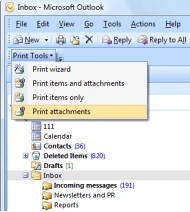
Print Tools for Outlook is a Microsoft Outlook add-in. It will help you automatically print incoming and outgoing messages with attachments (as well as messages and attachments separately) without even opening them. The plug-in automatically unpacks and prints packed ZIP and RAR attachments, and supports manual and automatic working modes. Program settings necessary for the automatic working mode are intuitively clear and few in number. Messages printed with Print Tools look exactly the same as those printed by the standard means of Microsoft Outlook. But the plug-in makes up for some of its shortcomings. Thus, you have to change the format of an HTML message to RTF or TXT to be able to print the message with the list of attachments, because none of Microsoft Outlook versions adds the list of attachments to the message header in the HTML format. Using Print Tools, you can forget about this problem. Using Microsoft Outlook rules together with the Print Tools plug-in allows you to create a system that will automatically print messages and/or files attached to them. Although Microsoft Outlook has a standard printing rule, you can neither specify (or forbid) specific file types nor print an attachment separately from its message. Print Tools makes it possible to print any message and attachment (as well as Notes, Tasks, etc.) of any format. To start printing, just click the Print Tools button on the Microsoft Outlook toolbar. The program is ready to work right after you install it. Make your work with correspondents easier! Designed for Microsoft Outlook 2000, 2002/XP, 2003 and 2007.
|
More to download:
Desktop Operation Sensor
Designed for scalability and integration between machine and supervisory levels, Desktop Operation Sensor could allows user to trigger and monitor many window processes at the same time (Real Time Synchronization).
WinCron .NET
WinCron .NET is task scheduling software for virtually any type of unattended task management. With its telnet interface, UNIX style Cron functionality, and full C# scripting support, WinCron .NET does it all: FTP, EMAIL, SMTP, POP3, File System, etc
Auto Mouse Clicker by Autosofted
The Autosofted Mouse Clicker and Recorder is a simple to use yet powerful tool. This is a FREE auto clicker mouse program which enables you to control where your mouse moves, when to click on something and how often to repeat the whole process.
|
|
|
Windows Backup |
Looking for backup software? Try Handy Backup - automatic data backup to DVD, CD, FTP, network, or Online. Client-server enterprise backup software.
|
|
Top Downloads |
Download, save and convert Redtube videos ( redtube.com ) to your PC
PhotoScape is an all-in-one style photo editor with fun and ease of use.
Convert any format video files with fast speed and excellent video quality.
|
|



