|
Become ready for the greatest software program download trip you have ever seen! Browse the many software sections, control the latest versions of the popular tools, and download software programs for free. Get easy admission to all sorts of laptop apps: corporate solutions and programs, antiviruses, education solutions, and many others. The Softempire ultimate software website grows constantly! Each current week carries attractive the latest software here, the first class software solutions. Obtain today and acquire a result!
Utility software downloads freeware, shareware, and demo Download now!
System software designed to help examine, configure, optimise, and maintain the computer.
Top Disk utility software downloads for Windows 7.
Windows utility software tool accumulation to appraise, organise, and optimise the activities of the computer.
|
Red Eye Remover Pro
|
|
Download
|
View screenshots
|
License: Freeware
File Size: 5.51 Mb
Version: 1.2
Release Date:
30 May 2007
OS: Win95, Win98, WinME, WinXP, Windows2000
System Requirements:
Pentium III
Company: VicMan Software
|
|
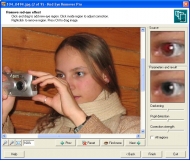
Now completely free! Red Eye Remover Pro is a must-have program for digital camera owners. Built-in flashes make red eye effect the most common problem for both professional and amateur photographers. Red Eye Remover Pro is a unique professional red eye correction tool based on advanced science-intensive technology.
Red Eye Remover Pro is able to automatically detect and instantly fix red pupils in multiple photos making batch red eye correction fast and precise. The program fixes images with just a few clicks - you just load photos with red eye into the program and Red Eye Remover Pro does the rest. Instances of red eye are effectively detected and fixed in the fully automatic mode in the vast majority of photos (the detection rate is 90%). Even if the program fails to detect all red pupils in the fully automatic mode (this can happen for instance in low-quality photos), all you need to do is select a rectangular area around the eye for the program to fix it. To achieve best results, you can adjust the correction options, and watch the results in real-time: you can make the pupil area darker or lighter to give the eye a natural look; adjust the pupil detection; or change the correction strength.
The program allows loading and saving three common image file formats (jpeg, bmp and png). It allows you to work with large collections of images at once and provides a number of saving options: you can save corrected images one by one or simultaneously; and save them to the original or new files. Red Eye Remover Pro also contains a plugin for creating thumbnails of your photos for web galleries.
|
More to download:
AutoTask 2000 Task Scheduler
AutoTask 2000 is a task scheduler designed specifically for Windows. AutoTask can be ran as a service or as a desktop application in the background. It has very flexible scheduling and conditional triggers for running various routine tasks.
J2K Converter
With the help of this original freeware you can converse a number of pictures of JPG 2000 format to BMP format. You can also sort the pictures and save the sorted series on your computer with the specified file name.
Screensaver Wonder 4
With Screensaver Wonder you can create your own screensavers from your own pictures, music and videos with over 100 image effects and options. The software is very easy to use and it allows you to create self-installing screensavers for easy sharing.
|
|
|
Windows Backup |
Looking for backup software? Try Handy Backup - automatic data backup to DVD, CD, FTP, network, or Online. Client-server enterprise backup software.
|
|
Top Downloads |
Download, save and convert Redtube videos ( redtube.com ) to your PC
PhotoScape is an all-in-one style photo editor with fun and ease of use.
Convert any format video files with fast speed and excellent video quality.
|
|



