|
Acquire utility quickly and easy. SoftEmpire catalog is happy to demonstrate a big variety of the splendid free software, shareware, and software. On this directory you can test trial releases of popular paid software programs, and setup the best freeware for your PC or digital device. Search an ultimate group of first class recent programs on SoftEmpire! Acquire demo versions and obtain recent apps on your PC or mobile gadget. See the latest editions and updates of classical tool, last programs, and PC utilities! Get for free!
List of utility software downloads for free and discount factor costs!
System software downloads for the newest versions and fresh updates.
best Disk utility software downloads for Windows 7.
Must - have utility software for Windows 7 to amend your system performance.
|
Shuric scan(clone and duplicate killer)
|
|
Download
|
Buy now!
|
View screenshots
|
License: Freeware
File Size: 0.69 Mb
Version: 2.15.730
Release Date:
15 Jul 2008
OS: Win95, Win98, WinME, WinNT 4.x, WinXP, Windows2000, Windows2003, Windows Vista Starter, Windows Vista Home Basic, Windows Vista Home Premium, Windows Vista Business, Windows Vista Enterprise, Windows Vista Ultimate, Windows Vista Home Basic x64, Windows Vista Home Prem
System Requirements:
8Mb RAM 1Mb HDD
Company: Shuric Com.
|
|
When creating your CD or DVD, or simply doing general cleaning of garbage on your hard
disk, it is often necessary to delete files copies, leaving on the disk only originals.
Shuric Scan was designed to solve this problem. It scans the disk searching for files
with identical contents. Shuric Scan finds ALL copies of the file regardless of their
names.
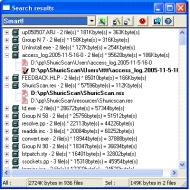
Unlike other similar programs, search results are shown as a tree, where the roots are
the groups of files with identical contents, and branches - files. This form of
displaying the search results is closest to the style of human thinking, and grants fast
and intuitive processing.
Shuric Scan uses an advanced file copy searching algorithm.
The main difficulties in searching for copies of a file are:
1) huge number of comparisons;
2) high load on the hard disk.
Shuric Scan overcomes these difficulties. The algorithm which this scanner is based on,
compares files only if they are at least similar. The software not only does not compare
"unsimilar" files, but doesn't even open them. The statistics show that the average file
is being compared not hundreds and thousands of times, as when using the "brute force"
method, but on average 1.5-2 times. Thus, the scanning algorithm reduces to an absolute
minimum file comparison operations, which significantly reduces the load on your hard
disk and considerably accelerates the process of scanning.
The more files of identical size that are on your hard disk, the more our software
outruns other similar programs. For example, when scanning through 8000 files with the
file size of 128K, the advantage of Shuric scan above other similar programs becomes
absolute.
|
More to download:
oakdoc PS to Image
PS to Image is a windows application which can directly convert ps/eps to dozens of image formats, such as bmpã??tiffã??jpegã
SysTools Outlook to Notes
Highly advance Outlook to Notes Conversion program to convert PST to NSF. Migrate Outlook mailboxes or emails, contacts, calendars etc to Lotus Notes NSF file with powerful SysTools Outlook to Notes migration tool.
|
|
|
Windows Backup |
Looking for backup software? Try Handy Backup - automatic data backup to DVD, CD, FTP, network, or Online. Client-server enterprise backup software.
|
|
Top Downloads |
Schedule, resume and accelerate downloads by up to 5 times with this accelerator
FrostWire - Download MP3s, Videos & Movies for FREE
Log into web sites with a single click. Fill web form details automatically.
|
|



