| Editor's choice |
Recover Word
Word Recovery is a Doc Repair Tool that recovers corrupted Doc File of MS Word
PDF Encryption Software
Disable PDF content copy printing encrypt password lock pdf set user owner
VeriTime Time Tracker Pro
VeriTime enables you keep track of task times more accurately and efficiently.
Text-to-PDF
Text-to-PDF is a program to convert ASCII texts into PDF format with a minim...
MyRide
MyRide - If you love your ride (vehicle, motorcycle, etc.), you'll LOVE MyRide!
XLS to PDF Converter
XLS to PDF Converter is fastest, simple and reliable batch conversion tool.
Repair Docx
Use Docx repair tool to combat word file corruption issues
|
|
Acquire excellent applications from the most popular sites! Check out called for software program and rare applications programs. Obtain commercial software, public domain apps, free apps, and demo verions to obtain in several groups. On our directory you can always download a novel computer software, or recieve the hottest editions of your most liked PC tools, apps, and educational softwares. To acquire the best software package to recieve, use handy collection or a intelligent classifier. The Softempire catalogue is permanently extended: if there is the most recent release of software you look for, it is probably to be in the network ultimate utilities collection!
Business utilities. Business software. The best and useful applications for your office including business software downloads, business applications, CRM, ERP. Programs for accounting, management and more.
|
TimePanic for Windows and Pocket PC
|
|
Download
|
Buy now!
|
View screenshots
|
Vendor Price: $ 76
License: Shareware
File Size: 5.88 Mb
Version: 2.3
Release Date:
26 Jul 2008
OS: WinXP, Windows2000, Windows2003, Windows Vista Home Basic, Windows Vista Home Premium, Windows Vista Business, Windows Vista Enterprise, Windows Vista Ultimate, Windows Vista Home Basic x64, Windows Vista Home Premium x64, Windows Vista Business x64, Windows Vista E
System Requirements:
Pocket PC 2002 or better. Internet Explorer 5.5 or better.
Company: Lionel Spohr
|
|
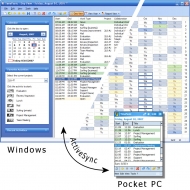
TimePanic is a mobile time tracking solution for the self-employed, for small businesses, or just for anyone who works on a computer. It consists of a fully grown Windows application and a lightweight Pocket PC application. Both applications can track your hours on a per project basis, distinguish between billable and non-billable tasks, let you enter comments and can be easily synchronized via ActiveSync. The Windows application also lets you manage your absences such as annual leave or sick leave, calculates overtime and prints reports. Unlike most other time tracking software, TimePanic is particularly good at tracking your hours in real time, as opposed to writing them down from memory at the end of the day or the week. With only two mouse clicks, you can track each relevant task switch in TimePanic at the very moment it happens. This saves you from the hassle of manual time entry, and along the way, your timesheets will become so accurate that your customers will not even think of questioning them. There are two features in TimePanic that support the two click task switch: First, the favorite activities feature lets you preconfigure your most frequently used tasks, and second, TimePanic can be set to run as a permanently visible icon in the notification area of the Windows task bar. The context menu of this icon displays the favorite activities as menu items. And when you are away from the office, you can use the Pocket PC version of TimePanic to continue tracking your time. A number of functions in TimePanic have been realized by means of the report feature. Besides printing, they include searching and exporting data. Reports are saved in a standard document format for further processing and printing by third-party applications should the need arise. Exported time tracking data can be easily imported into Microsoft Excel. TimePanic is available in English, German and French, and can also be purchased without Pocket PC application.
|
More to download:
Reminder-Organizer
It's a advanced and powerful PIM. The program can help you plan your business and private life. The program include next tools: a reminder, notebook, address book, passwords and calendar. This all is powerful, easy-to-use application.
Orange Revolution Alarm
This skinnable PIM includes talking alarm clock, scheduler, calendar and timer.
It is a special Orange Revolution (Ukraine) issue...
Witch PIM
Witch PIM is a portable PIM tool with Western Astrology and Chinese Qi Men Du Jia wisdom. No Greek, no field terminology, no obscure descriptions, just clear and useful instructions for your daily activities.
|
|
|
Windows Backup |
Looking for backup software? Try Handy Backup - automatic data backup to DVD, CD, FTP, network, or Online. Client-server enterprise backup software.
|
|
Top Downloads |
Download, save and convert Redtube videos ( redtube.com ) to your PC
PhotoScape is an all-in-one style photo editor with fun and ease of use.
Convert any format video files with fast speed and excellent video quality.
|
|



