|
Get prepared for the best software program download practice you have ever seen! Discover the numerous program groups, test the latest versions of the widely known tools, and demo software for free. Take special admission to all sorts of laptop apps: system solutions and utilities, firewalls, backup software solutions, and many others. The Softempire exclusive utility directory grows permanently! Every current week carries special the latest apps here, the best software utility solutions. Try now and recieve a result!
Shareware, freeware collection of exceptional desktop themes, screensavers, 3d wallpapers, icons and ICQ skins are available to download.
|
TrayDay
|
|
Download
|
Buy now!
|
View screenshots
|
Vendor Price: $ 14.95
License: Shareware
File Size: 0.95 Mb
Version: 7.03
Release Date:
7 Apr 2008
OS: Win95, Win98, WinME, WinNT 4.x, Windows2000, WinXP, Windows Vista Starter, Windows Vista Home Basic, Windows Vista Home Premium, Windows Vista Business, Windows Vista Enterprise, Windows Vista Ultimate, Windows Vista Home Basic x64, Windows Vista Home Premium x64, Wind
System Requirements:
HD space: 1.6MB
Company: MJMSoft Design Ltd.
|
|
TrayDay - date, calendar, week number and counter utility for the Windows tray, or Windows XP Notification area. TrayDay places an icon showing the date (day of the month) in the system tray. The icon resembles a page of a "tear-off" calendar. You can therefore see the date at a glance - often quicker and easier than resting your mouse over the clock, searching for an "Insert Date" menu, or having to reach for your diary. Move the mouse over the icon and the day of the week will appear; you can also have the Julian Day number in the Tooltip, and the "Internet Time" as defined by Swatch®. Left-click the icon and a pop-up menu appears showing the date in various formats - including up to ten user defined formats. Click one and it will automatically be inserted into your application (or copied to the clipboard, depending on the option checked in the right-click menu). Formats can include dates defined by calendar week and day number, as in 2008-W15-2 for April 8, 2008.
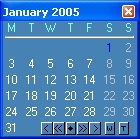
TrayDay also has a calendar option which displays a small calendar on your desktop. This calendar can display 1 or 3 months at a time, and has color scheme features. You can choose to have the calendar "on top" all the time for quick reference. Navigate months and years using the mouse or keyboard - or your mouse wheel - and type any date in the format of your choice. TrayDay can also display the week numbers on the calendar; press the W (or S) button on the calendar to switch week numbers on and off.
|
More to download:
Iconic Tray
This tiny utility lets you minimize any window either to the system tray, or to a special new tray (see image). This helps you keep your taskbar clean for often used apps. Minimizing can be carried out with mouse clicks and/or system-wide hotkeys.
Tray Pilot
Tray Pilot allows you to hide the System Tray icons. Just click a small button to the right of the System Tray, - your System Tray will hide and space for the taskbar buttons will be expanded...
@MAX Tray Player
Listen to some background music when working! This program inserts control buttons right into
your Windows tray. You don't even have to open the main program window to control the player.
It's lightning fast and has a low impact on system resources
WinTabs
WinTabs is a little program that makes it easier to access multiple documents while using one of the 71 supported programs.
Advanced Backup
This backup utility features backup of E-mail messages and address book, database of your messenger: ICQ, MSN, Yahoo!, AIM, Windows registry, Windows shell settings, and anything you wish to protect from hardware failure or accidental erasures.
Kill Win Pro
Kill Win Pro is a shutdown-tool for Windows.
Features:
places itself in system tray, can start automatically, shutdown, restart, logoff from Windows, reboot the computer, start a Windows-DOS-Box or the DOS-Mode, possibility of closing folde...
Project Clock Standard
Project Clock is an easy to use project time recording program. Project Clock is a useful application for consultants, lawyers, engineers or anyone else who must track time spent on different projects.
Virtual Stopwatch
Virtual Stopwatch is a feature packed clock program for Windows 9x, NT, 2000, or XP. It functions as a stopwatch, a timer, or a clock. It features a time logging system, user defined alarms, and a configurable graphic analog/digital display.
Stardust Wallpaper Control 2003
Stardust Wallpaper Control 2003 is a free taskbar accessory that lets you easily change and configure your desktop wallpaper. Change wallpaper with a single click, modify wallpaper settings, or set your system to automatically change wallpaper.
|
|
|
Windows Backup |
Looking for backup software? Try Handy Backup - automatic data backup to DVD, CD, FTP, network, or Online. Client-server enterprise backup software.
|
|
Top Downloads |
Schedule, resume and accelerate downloads by up to 5 times with this accelerator
FrostWire - Download MP3s, Videos & Movies for FREE
Log into web sites with a single click. Fill web form details automatically.
|
|



