|
Excellent software system downloads from the specialized in download catalogues! Investigate the called for programs lists, find out the latest refreshes of the famous programs tools, and try for free! Do not toss away opportunity to acquire the greatest applications: apply SoftEmpire directory to setup software applications for free of charge. Have a look on the aggregation of free programs and software program trial versions. Search among operating system softwares, setup managers, games, and all other forms of programms for your PC or mobile gadgets!
Internet utilities and tools for home and business. Programs for file sharing, download managers and e-mail software. Free download.
|
WebCam Monitor
|
|
Download
|
Buy now!
|
View screenshots
|
License: Freeware
File Size: 4.93 Mb
Version: 3.27
Release Date:
18 Oct 2006
OS: Win98, WinME, WinXP, WinNT 4.x, Windows2000, Windows2003
System Requirements:
win98 above
Company: vdocapture.com
|
|
You have a camera and want to do video surveillance of your property, but from your office or a comfortable location. You just need four things, a camera, your PC, Webcam Monitor and an Internet connection. The remote monitoring feature in WebCam Monitor is an ideal solution, as it gives you the ability to keep an eye on things from anywhere in the world. All you need to do is to connect your camera to your PC, start remote monitoring in WebCam Monitor, and stay informed of all activities as and when they happen.
Using WebCam Monitor, you can remotely view the activity from your camera in three different ways. You can watch a live feed from your webcam, use FTP to view uploaded video recordings and snaps on your website, or receive email with embedded snaps of the activity sent by WebCam monitor.
Let us look at each of the three different ways to turn your PC and camera into a remote video surveillance system.
Live streaming:
In live streaming the webcam connected to your PC uses the Internet to send video live to you. If you have the Internet bandwidth, this is the best way to monitor the action live.
Preparing for live streaming
First, you need to have a static IP address on the PC where the camera is connected. An Internet Protocol (IP) address is a unique number assigned for identification and communication to each computer in a network. A Static IP address does not change. In contrast, a dynamic IP address can change frequently. A dynamic IP address may work temporarily.
Live streaming will not work on non routable IP addresses. A non routable IP address starts with 192.x.x.x. If you are not sure what type of IP address you have, you need to find out from your ISP or a network professional.
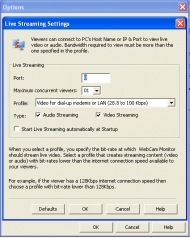
Configuring live streaming in WebCam Monitor
WebCam Monitor provides live streaming using Windows Media Streaming Technology.
|
More to download:
MonitorTest
Investigate the quality and performance of computer monitors and LCD flat panel screens using a series of 25 different test patterns displayed at various resolutions. Allows simultaneous testing of Multi-monitor configurations.
MSN Monitor & Sniffer
MSN Monitor & Sniffer is a network visibility tool to capture Conversationa of MSN chat on network. Just run the MSN Monitor & Sniffer on any computer on your network, and start to capture. It will record any conversation from any PC
Cyclope Enterprise Printer Monitor
Cyclope Enterprise is an easy to use application that monitors the activity of printers connected to a machine. The application provides information on user, on computers the request was made from, time of the printing job, number of printed pages.
Essential NetTools
Essential NetTools is a useful tool for diagnosing networks and monitoring your computer's network connections. It's a Swiss Army knife for everyone interested in a set of powerful network tools for everyday use.
NetSpeeder
NetSpeeder can fundamentally optimize your internet connection speed by up to 300% and substantially improve your download speeds for all types of connections from dialup to DSL, Cable, and Wireless...
IP-Tools
19 TCP/IP utilites in one program: Local Info, Connections Monitor, NetBIOS Scanner, Shared resources Scanner, HostName Scanner, Ports Scanner, Ping Scanner, Trace, LookUp, Finger, WhoIs, Time Synchronizer, Telnet client, IP-Monitor, etc.
Pocket PC Bulk Messaging Tool
Free online download bulk sms software, sends individual or group job alerts notification, promotional campaign, personalized SMS, invitation messages to friends, employees and relatives mobiles phones using windows based Pocket PC and PDA device.
Fabulous IP Cam Assistant
The software has been designed as universal application for surveillance hybrid platforms functioning at the same time with wireless and wired Internet cameras, TV-cards, capture cards, power-line, and USB cameras.
MOBILedit
MOBILedit is the universal phone management software that works with nearly all phones. After downloading MOBILedit to your PC, you can connect your phone via cable, Bluetooth or Wi-Fi. You will then be able to edit the entire contents of your phone.
|
|
|
Windows Backup |
Looking for backup software? Try Handy Backup - automatic data backup to DVD, CD, FTP, network, or Online. Client-server enterprise backup software.
|
|
Top Downloads |
Download, save and convert Redtube videos ( redtube.com ) to your PC
PhotoScape is an all-in-one style photo editor with fun and ease of use.
Convert any format video files with fast speed and excellent video quality.
|
|



